

Fake users on WordPress don’t announce themselves. They sign up, sit quiet for a while, then start posting spam comments, testing stolen passwords, or padding your user count with accounts that were never real people.
By the time you notice, you’re usually cleaning up a mess instead of stopping one.
Thus, you need to know what and how to spot fake user on WordPress before they register, not after they’ve already done damage.
Here’s what to look for.
What Counts as a Fake User on WordPress?
Not every strange-looking signup is fake. And not every fake signup looks strange. So before the checklist, a quick definition.
A fake user on WordPress usually falls into one of three groups:
| Type | What it is | Typical intent |
|---|---|---|
| Automated bot signup | Created by a script, no human involved | Spam comments, SEO link injection, form flooding |
| Disposable/throwaway signup | Real person, fake or temporary email | One-time access, avoiding spam, testing your site |
| Malicious sockpuppet account | Deliberately created to look legitimate | Credential stuffing, spam networks, review manipulation |
The distinction matters because each type leaves different fingerprints. A bot fires off dozens of registrations in seconds. A sockpuppet account might take its time and look almost real, right up until it starts posting.
That’s why a single red flag rarely proves anything on its own. What you’re really doing is stacking evidence.
One odd signal, you watch. Three or four together, you act.
12 Red Flags to Spot a Fake User on WordPress
Here are 12 ways that describe how to spot a fake user on WordPress
1. Email Domain Patterns

Check the email domain before anything else. It’s the fastest fake-user check you can run.
Disposable email services like Mailinator, Guerrilla Mail, 10minutemail, and Temp-Mail let anyone register without a real inbox. If you see one of these domains, or anything similar, the WordPress user account is never a real long-term user.
Also watch for a mismatch: an email like johnsmith92847@gmail.com tied to a username like “CryptoTrader_Pro” or “SEOExpert2024.”
Real users usually pick emails and usernames that loosely relate to who they are. Fake user accounts often don’t bother matching the two.
| Signal | Real user | Fake user |
|---|---|---|
| Email domain | Gmail, Outlook, work domain, ISP domain | Disposable/temp-mail domain |
| Name-to-email match | Loosely consistent | No relation at all |
2. Registration Timing Anomalies
Look at your users list sorted by registration date. Real signups trickle in, spread across the day, tied to when actual visitors land on your site.
Fake user on WordPress cluster. You’ll see 20, 50, sometimes hundreds of accounts created within the same few minutes, often overnight in your site’s time zone. The pattern is a script running, not people signing up on your website.
If your traffic doesn’t support that volume of real visitors, the user registrations don’t either.
3. Username Structure
Usernames tell you a lot before you check anything else. Three patterns stand out:
- Random strings: xk29fmq8, user9284712, names that look machine-generated
- Sequential patterns: user4471, user4472, user4473, created back-to-back
- Keyword-stuffed names: usernames packed with SEO terms, meant to show up in comment sections or author bylines, not to represent a person
Any one of these alone isn’t proof of a fake user on WordPress. All three showing up in a short window is.
4. Missing or Generic Profile Data

Open the account and look at what’s filled in.
A real WordPress user, even a lazy one, usually has something: a bio, an avatar, a website field, at minimum. They can also have a first and last name that aren’t identical to the username.
Fake accounts on WordPress are often bare. No bio, no avatar (default Gravatar only), and a “name” field that’s just a copy of the username.
It costs nothing for a bot to leave these blank, so it usually does.
5. IP and Geolocation Mismatches
Check the registration IP against your site’s actual audience. If you run a local business site and get a wave of user signups from IP ranges in countries that have no reason to be there, that’s worth a second look.
Same goes for known VPN or proxy ranges. Legitimate WordPress users use VPNs too, so this isn’t proof by itself. But paired with other flags on this list, an IP mismatch can hint at a fake user on WordPress.
6. Honeypot Field Triggers

If your user registration form has a honeypot field (a hidden input real users never see or fill in), any submission that fills it is a bot. No exceptions. No human ever fills in a field they can’t see.
This is the cleanest signal on this list because it has almost zero false positives.
If your form doesn’t have one yet, it’s one of the easiest additions to make and immediately improves every other check on this page.
7. No Referrer or Direct Traffic Spike
Check where your WordPress user registration traffic comes from. Most site tools log this, even a basic analytics setup.
Real user signups usually have a path. Someone found a blog post, clicked around, then registered.
Fake user signups often skip that path. You’ll see a spike of registrations with no referrer at all, or all pointing back to a single source.
A sudden wall of direct traffic, with no matching spike in page views elsewhere, is a sign someone’s hitting your registration form directly.
8. Suspicious Email-to-Username Ratio

Some email providers let you add a “+something” tag to your address. you+1@gmail.com and you+2@gmail.com both land in the same inbox.
Fake user on WordPress use this trick to register dozens of accounts from one real email. Same base address, different tag each time.
Look for repeated email patterns with small variations. A cluster of name+1@, name+2@, name+3@ accounts almost never means three real users. It means one person, or one script, working through a list.
| Pattern | What it usually means |
|---|---|
| One email, one account | Normal |
| Same base email, multiple +tag variants | Likely one source running multiple signups |
9. Immediate Post-Registration Behavior
Watch what a new account does right after signing up. Real users tend to browse first. They read a page, maybe leave a comment, before doing much else.
A fake user on WordPress often skips that step entirely. A comment posted seconds after registration, especially one with links or generic praise, is a strong signal. So is an account that goes straight to a contact form or a comment box without visiting anything else first.
Timing here matters more than content. Even a normal-sounding comment posted 10 seconds after signup is worth flagging.
10. User Agent Inconsistencies
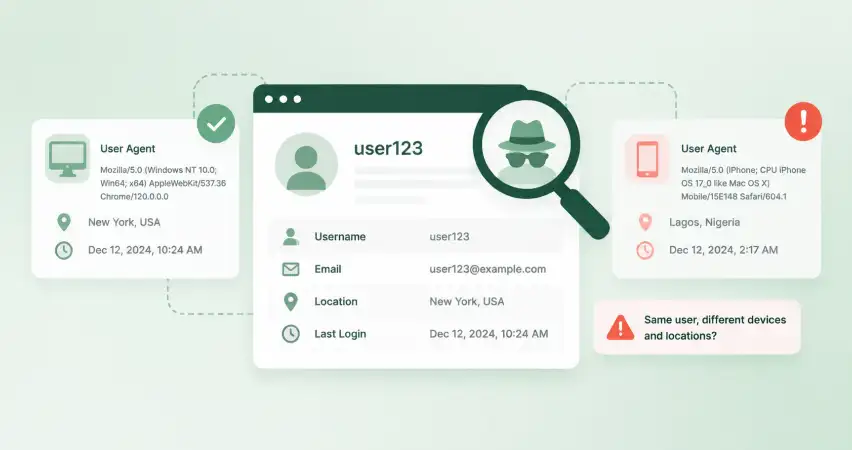
Every browser sends a user agent string when it connects to your site. Most WordPress security plugins and some hosting dashboards log this per registration.
Bots often use outdated, spoofed, or headless browser signatures. Tools like Puppeteer or Selenium don’t match any real browser a person would use. You might see a user agent claiming to be an old version of Chrome that stopped getting updates years ago, or one with no browser details at all.
This one takes more digging than the others. Worth checking if you’re already seeing two or three other flags on the same account.
11. Password Pattern Reuse
This is harder to check manually, but worth knowing about. Some fake account campaigns reuse the same password, or a small set of passwords, across every account they create.
You won’t see the plaintext password; WordPress hashes it. But if you’re running a security plugin that flags repeated hash matches across new accounts, that’s a strong signal of a coordinated signup, not individual people choosing their own passwords.
If you don’t have a tool that checks this, it’s fine to skip. The other 11 signals will catch most fake users on WordPress without it.
12. Role or Capability Request Anomalies
Watch what a new account tries to access right after registering. A real user on WordPress has no reason to poke around admin areas or plugin settings.
A fake user on WordPress testing for weaknesses might try anyway. Repeated attempts to load /wp-admin/, edit pages they don’t own, or access settings pages, all within minutes of signup, point to someone testing what they can get away with.
This is one of the more serious flags on this list. Pair it with even one other signal, and it’s worth acting on immediately, not just watching.
Quick Manual Check to Spot Fake User on WordPress
Review Your wp_users Table
You don’t need a plugin to run a first pass. WordPress gives you most of what you need in the dashboard.
Go to Users → All Users. Sort by registration date, newest first.
This alone surfaces the timing clusters from signal 2 and the sequential usernames from signal 3.
From there:
- Scan the email column for disposable domains or repeated +tag patterns.
- Click into any account with a blank bio or default avatar.
- Check the “Registered” timestamp against your traffic logs for that day.
If you want to go a level deeper, phpMyAdmin gives you direct access to the wp_users table. A simple query pulls accounts registered in a tight window:
SELECT user_login, user_email, user_registered
FROM wp_users
WHERE user_registered BETWEEN ‘2026-09-01 00:00:00’ AND ‘2026-09-01 06:00:00’
ORDER BY user_registered ASC;
Swap the dates for whatever window looks suspicious. If that query returns 40 accounts created six minutes apart, you’ve found your bot run.
This isn’t something you need to do daily. Once a week, or right after a spam wave hits your comments, is enough to catch most patterns before they grow.
Red Flags vs. False Positives to Spot Fake User on WordPress
A privacy-conscious user on a VPN, a legitimate signup from another country, someone with a blank bio because they just don’t fill out forms. None of these alone means anything.
The signals on this list work in combination.
| Number of flags present | What it likely means | What to do |
|---|---|---|
| 1 flag | Coincidence, or a real user with unusual habits | Watch, no action needed |
| 2-3 flags | Worth a closer look | Hold the account, don’t approve yet |
| 4+ flags | Very likely fake | Reject or delete |
A single VPN signup isn’t a problem. A VPN signup with a disposable email, a sequential username, and an immediate comment with a link in it is a different story.
This is also why a WordPress user approval plugin that lets you review signups before they go live matters more than one that blocks based on a single rule. A hard block on VPN traffic, for example, catches privacy-conscious real users along with the bots.
A review queue lets you weigh the flags together before deciding.
What to Do Once You’ve Spotted One
Spotting a fake account is only half the job. What you do next decides whether it actually costs you anything.
Don’t approve by default. Most WordPress sites let anyone register and go live instantly. That’s the setting causing most of this. If registrations sit in a queue until someone checks them, every flag on this list becomes something you can act on before damage is done, not after.
Hold, don’t delete, borderline cases. If an account hits 2-3 flags, park it. Give it a few days. Real users with unusual signup patterns usually do something normal soon after, like leaving a real comment or updating their profile. Fake accounts usually don’t, because there’s no person behind them to follow up.
Delete in batches, not one at a time. Once you’ve confirmed a cluster of fake accounts, usually from the timing and username checks, clean them out together. Going through a spam wave one account at a time wastes time you don’t need to spend.
Set up a review step, not just a filter. CAPTCHAs and honeypots catch bots. They don’t catch a disposable email address or a sockpuppet account built to look real. For that, you need a point where a real person looks at the signup before it goes live. This is where a plugin like New User Approve fits in. It holds new registrations for manual review instead of activating them automatically, so the checklist above becomes something you can actually apply before an account does anything.
If you’re already fighting a spam problem, our guide on preventing fake WordPress signups covers the setup side: CAPTCHA, honeypots, and registration restrictions.
Last Word
Spotting a fake user on WordPress is the first step. Reviewing signups before they go live is the second, and it’s the one that actually stops the damage.
Start with the checklist above. Once you’re catching the patterns, a manual approval queue does the rest of the work for you.
FAQs About How to Spot Fake User on WordPress
How do I know if a WordPress user registration is fake?
Look for a combination of signals: a disposable email domain, a username that looks random or sequential, a blank profile, and registration timing that clusters with other new accounts. One flag alone rarely confirms it. Three or four together usually do.
Can fake users hurt my WordPress site?
Yes. Beyond inflated user counts, fake accounts get used for spam comments, credential-stuffing attempts against other accounts, and testing for security weaknesses. Left unchecked, they also make real usage data harder to trust.
What’s the difference between a bot signup and a spam signup?
A bot signup is created entirely by a script, often in bulk, with no human involved. A spam signup might be created by a person, but the intent is the same: post links, promote something, or game a comment section. Both show up in the same checklist, just with different timing patterns.
Should I delete suspicious users immediately or review them first?
Review first, unless the account has already done something harmful, like posting spam or trying to access admin pages. Borderline cases (2-3 flags) are worth holding for a few days before deciding.
Does WordPress have built-in fake user detection?
No. Core WordPress has no built-in system for flagging suspicious registrations. Everything on this list has to be checked manually or through a plugin that adds a review step, like a registration approval queue.