



Still trying to decide what platform to build your website on?
It’s a big choice. And it’s not just about design or features. It’s about control, cost, and whether your site will still work a year from now.
So, why choose WordPress in 2025?
Because it gives you ownership. You control the content, the plugins, the design; in short, everything. There’s no lock-in. No forced updates. No surprise limits. And it powers over 40% of all websites for a reason.
This blog breaks down the facts and offers clear reasons why you should choose WordPress in 2025 and beyond in a crowded market.
WordPress vs. Wix and Other Major Website Builders (2025 Comparison)
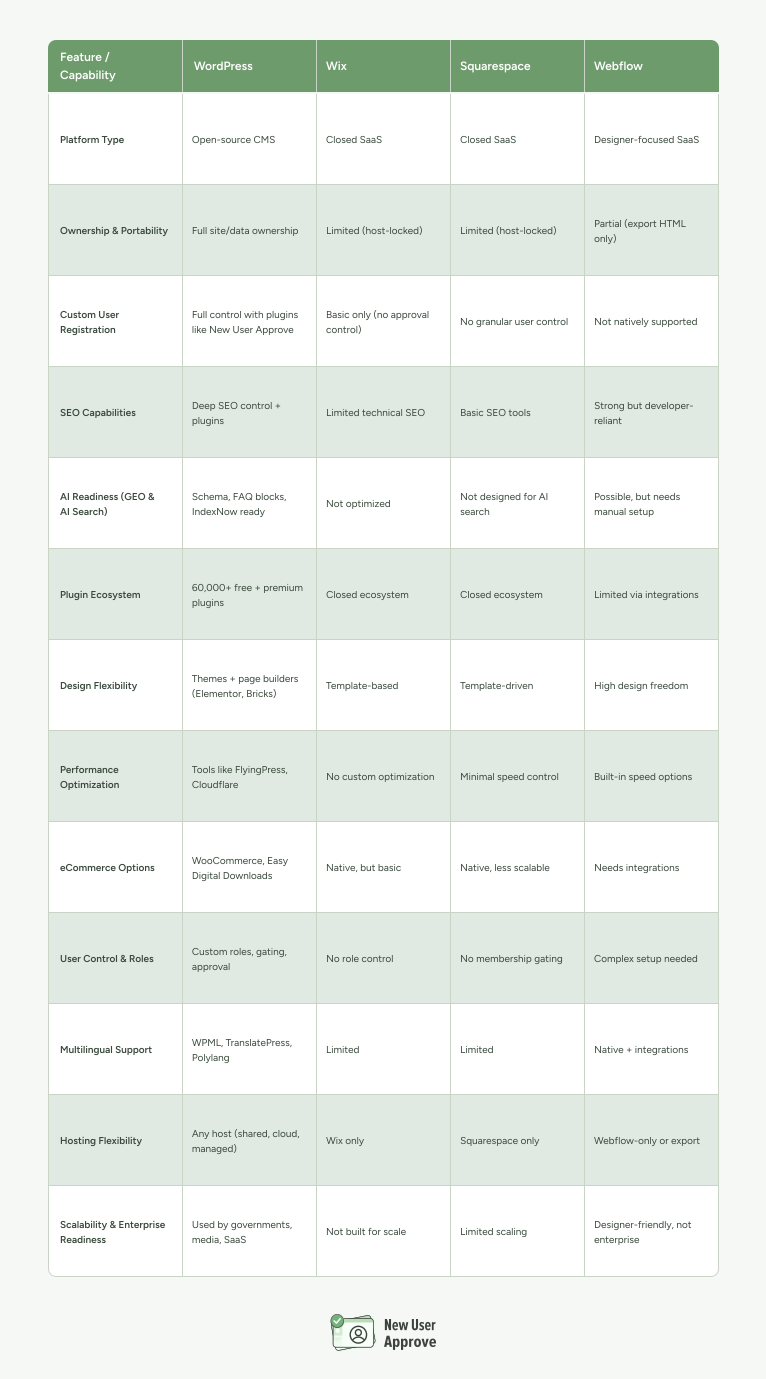
So, whether its Wix vs WordPress or other website building platforms, WordPress clearly has an edge.
How WordPress Leads the Internet in 2025
WordPress still powers more websites than any other platform.
That’s not opinion it’s data.
As of mid-2025, W3Techs reports that WordPress runs over 43% of all websites globally. That includes small blogs, online stores, enterprise portals, government sites, and more.
Why does that WordPress stats matter?
Because it proves WordPress isn’t just popular. It’s trusted by individuals, startups, and Fortune 500 companies alike. It’s used in every industry.
That kind of adoption doesn’t happen unless the platform works and keeps working.
WordPress is open source, and that gives it a huge edge
You’re not renting space from a SaaS company. You’re building on a self-hosted CMS that’s backed by a global community. That community includes developers, designers, accessibility experts, plugin authors, and hosting providers, all contributing to keep the ecosystem stable and growing.
In short:
- You’re not locked into WordPress pricing changes or feature limitations.
- You can build anything: a membership site, an LMS platform, a WooCommerce store, a blog, or a mobile app backend.
- If a plugin or theme doesn’t exist, someone’s probably already building it. Or you can build a WordPress plugin yourself.
The ecosystem keeps growing
In 2025, the WordPress Plugin Directory now lists 60,000+ free plugins. There are more than 11,000 themes, with full site editing (FSE) adoption growing fast. WordPress now supports block-based layouts natively, making it easier to build webpages without code.
And it’s not slowing down. The roadmap shows a clear push toward better performance, multilingual support, and improved admin UX.
Bottom line
The WordPress ecosystem is large and alive. It grows with the web. It adapts fast. And it gives you a stable foundation that doesn’t tie your business to someone else’s business model.
How WordPress Thrives in the AI Search Era (GEO, ChatGPT, and AI Overviews)
Search has changed, and Google is no longer the only gatekeeper.
In 2025, people are getting answers from ChatGPT, Bing Copilot, Perplexity, Gemini, and even voice assistants. These platforms don’t show traditional web results. They summarize and cite Google search results.
That shift has created a new challenge:
If your content isn’t structured right, AI might skip you entirely. And here comes GEO (Generative Engine Optimization)
GEO is how you prepare your website for AI SEO or AI search. It’s not a gimmick. It’s the reality of modern content visibility.
Unlike traditional SEO, GEO focuses on:
- Structured data (like schema markup)
- Clear, direct answers (FAQs, comparisons, how-to steps)
- Content formatting that’s machine-readable
WordPress handles all of this better than most WordPress alternatives.
Why WordPress has the edge in AI search
- Schema plugins are built-in:
Plugins like Rank Math and AIOSEO let you add schema markup to every page or post, like FAQ, Product, HowTo, Article, without writing a single line of code. - Block-based editing makes structure easy:
With Gutenberg and full-site WordPress editing, your pages are already semantically organized. That helps ChatGPT and AI overviews parse your content cleanly. - Built-in integrations with IndexNow and Bing:
WordPress plugins and tools now support IndexNow. As a result, your content gets pulled by Bing and other engines faster, using real-time indexing APIs. - Flexible content types:
With custom post types and reusable blocks, you can structure your knowledge base, documentation, or product content for maximum discoverability.
WordPress helps you reach multiple channels at once
- Google AI Overviews cite FAQ-rich, structured articles
- ChatGPT and Perplexity favor websites with fast load times, clean hierarchy, and trustworthy metadata
- Voice assistants like Alexa and Siri rely on concise, direct answers often pulled from well-marked schema
It’s not about keywords anymore. It’s about clarity.
If your content is vague, long-winded, or buried under fluff, AI models won’t pick it up. WordPress helps you avoid that. The tools, structure, and plugins all make it easier to produce clear, AI-friendly content that’s actually searched and found.
How WordPress is Exceptional for Unmatched Flexibility & Customization
Why choose WordPress in 2025?
Because no other platform gives you this level of control over how your website looks, works, and grows, without locking you in.
Unlike Wix, WordPress is not limited by a company’s feature roadmap. You’re not stuck waiting for a new feature to be released.
You can create a WordPress user role, build it, extend it, or integrate it today.
1. Thousands of Themes and Builders
There are 11,000+ free themes in the official WordPress.org repository and thousands more premium themes from marketplaces like ThemeForest and independent developers.
Popular 2025-ready theme frameworks:
- Blocksy – Lightweight, fast, Gutenberg-native
- Kadence – Excellent design system, WooCommerce support
- GeneratePress – Developer-friendly and minimal
- Spectra One – From the makers of Astra, optimized for blocks
WordPress page builders like Elementor, Bricks, and Breakdance still thrive. However, full-site editing has made native Gutenberg themes a strong alternative for speed and WordPress SEO.
2. Plugins That Do (Almost) Anything
There are 60,000+ plugins in the WordPress repository. Need to build a:
- Learning platform? → Use Tutor LMS or LearnDash
- Membership site? → Try MemberPress or Paid Memberships Pro
- Online store? → Go with WooCommerce (used by 30%+ of all eCommerce stores worldwide)
- Booking system? → Use Bookify, Amelia, or Gravity Booking
- Community site? → Use BuddyBoss, bbPress, or PeepSo
There’s a plugin or integration for almost every use case. Most of them are modular, so you only install what you need.
All the above facts mean better performance and less bloat.
3. Extend Beyond a Website
In 2025, WordPress isn’t just for blogs or business sites. It powers:
- SaaS platforms (with custom dashboards and REST API)
- Web apps (built using WP as a backend + React frontends)
- Directories and marketplaces (GeoDirectory, HivePress, Marketify)
- Mobile apps (using AppPresser or custom APIs)
You can create headless WordPress setups using frameworks like Next.js or Nuxt, giving you 100% control over frontend design while keeping the backend familiar.
4. Automation and Integrations
With plugins like WP Fusion, Uncanny Automator, and Zapier integration, you can:
- Tag users based on behavior
- Trigger emails from your CRM
- Sync with Google Sheets or Slack
- Automate course enrollments, access levels, and upsells
WordPress is ideal for businesses that want more than just a static site. You can automate workflows across marketing, sales, support, and delivery.
WordPress isn’t just flexible. It’s extensible in every direction, and it gives you full control over the design, features, and growth path.
How WordPress is Unique in Security, Privacy, Accessibility & Compliance
Why choose WordPress in 2025 is a serious question if you’re serious about safety, trust, and legal compliance. Because WordPress gives you full control over your site’s security, privacy policies, and accessibility, something most SaaS platforms still can’t match.
Let’s break it down.
1. WordPress Is Secure If You Use It Right
The core WordPress software is secure. It’s audited by hundreds of contributors and security firms worldwide.
Vulnerabilities mostly come from outdated plugins, weak passwords, or poor hosting setups, not WordPress itself.
In 2025, WordPress introduced key security improvements:
- Automatic rollback protection: If a plugin update breaks your site, it automatically reverts to the previous version.
- Modern password hashing: Stronger encryption out of the box.
- Block-based permissions: Limit editor access by block or post type.
What are the best practices for securing a WordPress site?
- Use a security plugin like Wordfence, Patchstack, or Solid Security Pro
- Install a WAF (Web Application Firewall) through hosts like Kinsta or Cloudflare
- Set up two-factor authentication for all WordPress admin users
- Disable XML-RPC and limit login attempts
- Choose managed hosting with real-time malware scanning
2. Compliance Made Simple: GDPR, CCPA, and More
Unlike Wix, where you’re stuck waiting for privacy features, WordPress offers full control over how user data is collected, stored, and deleted.
Use plugins like:
- Complianz – Handles cookie banners, geo-targeted notices, and consent logs
- WP Legal Pages – Generates GDPR/CCPA/Privacy policies
- CookieYes – For cookie management and auto-script blocking
- Limit Login Attempts Reloaded – Helps with data breach protection
Newer trends in 2025 also mean:
- You must now log consent and allow for “data portability” (user can request their data in a usable format)
- WordPress plugins like Delete Me or User Data Requests Manager help automate this easily
Bonus: Self-hosted WordPress puts you in control of data residency, crucial for companies in the EU or regions with strict privacy laws.
3. Accessibility Is Not Optional Anymore
Most AI search engines and user experience algorithms now score sites based on accessibility. That includes how easily people with disabilities can navigate your content.
In WordPress, you can:
- Use accessibility-ready themes (checkmark available in the .org theme repo)
- Add proper headings, alt text, ARIA labels using native block tools
- Audit your site with plugins like WP Accessibility or browser tools like axe DevTools
- Stay WCAG 2.2 compliant using Equalize Digital’s Accessibility Checker
Agencies and enterprise site builders are now required to meet ADA (in the U.S.) and EN 301 549 (in the EU) compliance levels, WordPress is up to the task.
4. Real Ownership = Real Responsibility
This is where WordPress wins big:
You own your content, your data, your code.
There’s no vendor lock-in. You’re not dependent on a platform’s terms of service, uptime, or legal jurisdiction. If a plugin fails, you replace it. If a host underperforms, you migrate.
In 2025, digital ownership isn’t just a tech term. It’s a business risk mitigation strategy.
Compare that to:
- Shopify: Owns the checkout and payment process
- Wix: Owns your site’s hosting and file system
- Squarespace: Limited plugin ecosystem and no database access
With WordPress, your content, functionality, and customer data are yours forever.In short: Choosing WordPress in 2025 gives you the tools to build a site that’s secure, compliant, and future-proof.
WordPress SEO for 2025: A Winning Formula For Both Google & AI
Why choose WordPress in 2025 if SEO and visibility matter to your business?
Because it’s one of the few platforms built to handle both traditional SEO and AI-powered search engines like ChatGPT, AI Overviews, Perplexity, and Bing Copilot.
Here’s how it holds up both technically and strategically.
1. Technical SEO Starts at the Foundation
WordPress makes technical SEO manageable, even if you’re not a web developer.
Here’s what’s built-in or easy to add in 2025:
- Clean URL structures (e.g. yoursite.com/topic-name/)
- Mobile-first themes that meet Google’s rendering guidelines
- Native lazy loading for images and iframes
- Automatic XML sitemaps and RSS feeds
- IndexNow integration via plugins like Rank Math or IndexNow Helper
Most WordPress themes today (especially from Kadence, GeneratePress, or Blocksy) are optimized for Core Web Vitals, including:
- First Input Delay (FID)
- Largest Contentful Paint (LCP)
- Cumulative Layout Shift (CLS)
With tools like Perfmatters, FlyingPress, or WP Rocket, you can fine-tune performance without touching code.
2. Structured Content: The Hidden Goldmine
Search engines (including AI searches) love structured data. WordPress is ideal for that.
Popular plugins like Rank Math, Schema Pro, and Yoast SEO allow you to embed schema types like:
- FAQPage
- HowTo
- Product
- Event
- LocalBusiness
- Course
- JobPosting
More importantly, AI models now rely on structured FAQs and semantic content to summarize sites. If you don’t use schema, you risk being skipped by AI summaries and AI-friendly responses.
In 2025, even blog posts can include these:
- Clear heading hierarchy (H1 > H2 > H3)
- Short, bullet-point answers to common questions
- Blockquote sections for expert comments
- JSON-LD schema per post type
Bonus: Plugins like AIOSEO now include AI-specific schema for better alignment with custom GPTs and Microsoft Copilot integrations.
3. SEO = Content + Architecture. WordPress Does Both.
Google still looks for topic clusters, internal linking, and pillar content. WordPress makes that natural.
How?
- Categories and tags help organize your content into topical silos.
- Navigation menus, breadcrumbs, and related posts build internal links.
- You can use custom post types (CPTs) for FAQs, docs, case studies, and more.
Combine this with modern page builders (e.g., Gutenberg + GenerateBlocks) and you can build lightning-fast and schema-ready SEO landing pages. That too without any coding knowledge.
4. Voice Search and AI Search Optimization
With 2025 being the year of zero-click answers and AI-powered answers, WordPress stands out because:
- You can create answer-style content (like this section) that fits AI scrape formats.
- You can optimize pages with natural language Q&A, voice-friendly headings, and clear summaries.
- WordPress lets you insert meta descriptions, page-level schema, and Open Graph tags, so ChatGPT and other AI bots can pull the right summary or preview.
Voice search-ready content includes:
- Short, natural language paragraphs
- Clear answer-first formatting
- Use of bullet points and tables
- FAQ blocks powered by the FAQPage schema
Many newer AI search engines pull answers directly from properly marked-up content, even bypassing Google’s index. WordPress lets you control how that happens.
5. Plugins That Stay Updated With Algorithm Changes
WordPress SEO isn’t just about content. It’s about keeping up.
Plugins like:
- Rank Math Pro: Real-time SEO suggestions, IndexNow support, schema builder
- AIOSEO: WooCommerce integration, link assistant, SEO audit checklist
- SEOpress: Lightweight but powerful, includes AI meta tags and white-label features
- Slim SEO: No configuration needed. Fast and clean
Hosting also matters. So,
Choose a host that supports server-side caching, object caching, and the latest PHP/MySQL versions to boost TTFB (Time To First Byte) and site performance.
6. Continuous SEO Monitoring = Better Rankings
With WordPress, you can run SEO audits regularly without a full-time WordPress development agency:
- Use Ahrefs Webmaster Tools, Google Search Console, and Bing Webmaster Tools to monitor crawl issues
- Install SEO audit plugins like Site Kit, Screaming Frog (desktop), or SEMrush integration
- Use uptime monitoring tools like UptimeRobot to catch WordPress site errors early
In short
WordPress is still the best platform in 2025 for SEO and AI responses. It gives you full control over how your content is structured, served, and updated.
You can’t buy SEO success. But WordPress makes it far easier to build it.
How WordPress Offers Cost Transparency & Future-Proof Value
Why choose WordPress if you’re building with a long-term mindset? Because it’s one of the only platforms that gives you full cost control (upfront, ongoing, and down the road).
You own the site. You choose the tools. And you decide how much to spend and when.
Let’s break this down.
1. WordPress Core is Free (and Always Will Be)
The WordPress software is open-source under the GPL license. That means:
- No subscription fee for the CMS itself
- No vendor lock-in
- No limits on how many pages, users, or features you can add
This is a big deal. With Wix or like, you’ll pay monthly just to stay online. Sometimes, even if you don’t update your site.
2. You Control Your Stack, So You Control Your Costs
Here’s what you pay for with WordPress:

You get the option to choose where to save and where to invest.
3. No Surprise Upgrades or Forced Plans
With many SaaS builders, you’ll start at a “free” tier, only to find out:
- You can’t use your own domain
- You’re limited to 5 pages
- You need to upgrade to unlock basic SEO or analytics
- You’re stuck when prices increase (and they will)
With WordPress, once your site is online, it stays online. You’re not locked into their pricing. You can switch hosts. Downgrade plugins. Change themes.
The entire stack is modular.
4. You Can Scale Without Paying More
WordPress sites scale well, both technically and financially.
Whether you’re launching a small brochure site or a high-traffic membership platform, you don’t need to rebuild. You just extend the existing system.
You can add:
- eCommerce (WooCommerce)
- Bookings (Amelia, Simply Schedule)
- LMS (TutorLMS, LearnDash)
- Forums (bbPress)
- Memberships (Paid Memberships Pro, Restrict Content Pro)
All without switching platforms.
5. Future-Proof = No Platform Shutdown Risk
Worried about platforms disappearing? You should be.
- Google Domains was shut down.
- GoDaddy Studio is being phased out.
- Many AI website builders are still in beta and may not survive.
WordPress has been here for 20+ years. It’s backed by a global community, thousands of developers, and businesses that rely on it. It’s not going away and it’s not trying to sell you services you don’t need.
That’s what makes WordPress future-proof.
Key takeaway:
WordPress doesn’t just lower your upfront costs. It protects you from future expenses, vendor lock-ins, and surprise changes. That’s why developers, startups, and serious business owners still choose WordPress in 2025.
How WordPress is The Best For Control, Customization & Developer Freedom
WordPress gives you control that other platforms don’t.
That’s a big deal in 2025 when many tools lock you into rigid templates, limited settings, or proprietary backends. With WordPress, you can customize everything.
You Get Full Control Starts with Open Source
WordPress is open-source software. That means no one company owns your website.
You can change the code, edit your theme, or even build your own plugins.
Whether you’re using a simple block theme or running a complex web app, WordPress doesn’t put artificial limits on how your site works.
LSI keywords included: open-source CMS, full site editing, customizable website, platform flexibility, and theme development.
Can You Monetize with WordPress in 2025?
Yes! and in more ways than you think.
WordPress isn’t just a publishing platform anymore. It powers full-scale digital businesses, creator brands, and online services, all without platform lock-in.
Let’s look at how real people are making money with WordPress right now.
eCommerce: Still a Top Monetization Path
WooCommerce powers over 25% of all online stores worldwide (source: BuiltWith, 2025). It’s free, scalable, and owned by Automattic; the same minds behind WordPress.com.
You can sell:
- Physical products
- Digital downloads (PDFs, apps, licenses)
- Print-on-demand items
- Subscriptions and bundles
Popular WooCommerce add-ons in 2025:
- Woo Subscriptions – recurring payments
- WP Simple Pay – Stripe payments without a cart
- Payment Plans – Payment in instalments along with Buy Now Pay Later options
LicenseManager – secure software license sales
Memberships, Courses, and Communities
If you’re a coach, teacher, or content creator, WordPress can run your whole paid membership system. Tools like:
- MemberPress
- Sell Content
- WishList Member
- BuddyBoss (for private communities)
- LearnDash or Tutor LMS for course platforms
You can:
- Publish gated content or paywalled content
- Sell tiered access levels
- Drip course modules over time
- Host private forums or masterminds
Ad Revenue & Affiliate Marketing
If you’re focused on traffic, monetization through ads or affiliate links still works in 2025; especially with focused SEO and GEO strategies.
For ads:
- Use Advanced Ads or Ad Inserter
- Connect with Google AdSense, Ezoic, or Mediavine (for high-traffic sites)
For affiliate:
- Use Pretty Links to track links
- Add comparison tables with WP Table Builder
- Promote software, tools, courses, or anything with a recurring payout
Bonus: WordPress’s flexibility lets you place affiliate links naturally across FAQs, CTAs, reviews, and blog content, all indexable by Google and AI Overviews.
Monetizing Digital Services
Freelancers and WordPress development agencies use to:
- Sell booking-based services (with tools like Gravity Booking or Bookify)
- Offer freelance packages with Paywall or Easy Digital Downloads
- Build client dashboards for white-labeled services
You can even create client portals, quote forms, and retainer payment systems — all directly on WordPress.
WordPress SEO = Long-Term Revenue Potential
Monetization isn’t just about features. WordPress gives you long-term leverage:
- Own your content
- Rank for keywords over time
- Optimize for GEO, voice, and AI search
- No rising fees with rising traffic
Other platforms take a cut. With WordPress, you keep what you earn.
Key takeaway:
Whether you’re selling digital goods, running a membership site, or monetizing content, WordPress gives you the tools, flexibility, and ownership for maximum monetization.
Who’s Winning with WordPress in 2025? Top Brands Using WordPress
Still think WordPress is just for blogs? You’re not alone. In fact, that idea is outdated.
Right now, WordPress powers over 43% of all websites globally (W3Techs, July 2025). And it’s not just freelancers or small blogs using it.
You’ll find WordPress behind Fortune 500 companies, government portals, creator brands, and fast-growing startups.
Let’s look at who’s using it and how.
Global Brands on WordPress
These companies run high-traffic, scalable websites using WordPress:
- Sony Music – Content-rich artist pages, event listings, and media.
- The Walt Disney Company – Corporate site using WordPress VIP.
- Time Magazine – News site with millions of monthly visits.
- Mercedes-Benz – Country-specific sites built on WordPress.
- Microsoft News – Some regional blogs run on WordPress CMS.
These aren’t just static pages. They’re integrated with CRMs, video platforms, analytics, and custom APIs, showing WordPress scales to any level.
Solopreneurs and Indie Creators Using WordPress
Creators, consultants, and coaches are launching full-stack businesses on WordPress:
- Ali Abdaal – Online courses and blog built on WordPress + ConvertKit.
- Pat Flynn (Smart Passive Income) – Runs a multi-product brand using WordPress.
- Kopywriting Kourse – Educational business built with MemberPress + WP Simple Pay.
- Nathan Barry – Used WordPress for early stages of ConvertKit.
They monetize through:
- Courses
- Newsletters
- Memberships
- Affiliate content
- Paid communities
The common theme: ownership. No middlemen. No platform shutdown risk.
Startups & SaaS
Startups use WordPress to:
- Launch content marketing quickly
- Host support documentation
- Build affiliate hubs
- Create landing pages and microsites
Some use it as a marketing site, others use Headless WordPress to power frontend apps using React or Vue.
Examples:
- Slack’s blog
- Dropbox’s product updates
- FreshBooks help docs
These are tightly integrated setups, proving WordPress isn’t limited to “just WordPress themes.”
Real WordPress Stats from 2025
- Approx 532 million websites use WordPress as of July 2025 (W3Techs).
- WordPress powers more websites than Shopify, Wix, Squarespace, and Webflow combined.
- WordPress is the top CMS choice for SEO-driven companies, based on Sistrix 2025 data.
Key takeaway:
Whether you’re building a blog, an agency, a SaaS company, or a media brand, WordPress offers the infrastructure and freedom to grow in 2025 and beyond.
What Are the Most Common WordPress Myths in 2025?
Many people still hesitate to choose WordPress. Not because of what it is but because of what they think it is.
Let’s break down the biggest myths still floating around in 2025, and why they don’t hold up.
“WordPress is only for blogs”
Fact:
WordPress started as a blogging tool, but that was in 2003. Today, it powers everything from eCommerce stores to SaaS frontends.
- WooCommerce supports over 5 million online stores globally.
- Major platforms like Time Magazine, TechCrunch, and BBC America run full-featured media portals on WordPress.
- Thousands of SaaS and product companies use WordPress for content hubs, landing pages, and gated areas.
“It’s not secure”
Fact:
The core software is stable and secure if you keep it updated.
- WordPress has a dedicated security team of 50+ experts (including lead developers and security researchers).
- Most security issues come from outdated plugins or weak passwords, not the platform itself.
- Major managed WordPress hosts like WP Engine, Kinsta, and Cloudways include auto-updates, firewalls, and malware scans.
- Plugins like Wordfence and iThemes Security harden your site with a few clicks.
Extra proof:
WordPress passed 3rd-party penetration tests in 2025 audits by Patchstack and GoDaddy Pro Labs.
“WordPress is slow”
Fact:
A clean WordPress install is lightweight as it uses React.js as a frontend. WordPress has a complementary partnership between PHP and React.js. Slowdowns usually come from:
- Bloated themes
- Excessive plugins
- Shared hosting
But with good practices, WordPress can be lightning-fast.
- Themes like Blocksy, GeneratePress, and Kadence are optimized for speed.
- Page builders like Breakdance and Bricks beat older tools like Elementor.
- Tools like FlyingPress, LiteSpeed Cache, and Perfmatters make speed tuning easy.
- Managed hosts often hit < 1.2s load times globally on GTmetrix and WebPageTest.
“WordPress doesn’t scale”
Fact:
Scaling depends on your infrastructure, not WordPress itself.
- Enterprise-level WordPress runs on WordPress VIP, Pantheon, and Scaleflex.
- High-traffic sites serve millions of monthly views using CDNs, object caching, and container hosting.
- Headless WordPress setups split frontend/backend to handle huge traffic spikes, used by Rolling Stone, PlayStation, and News Corp.
“You have to do everything yourself.”
Fact:
WordPress has huge service ecosystems.
- You can hire agencies, freelancers, or use done-for-you services.
- Most major tools like CRMs, analytics, email marketing offer native WordPress plugins.
- Platforms like New User Approve, and MemberPress let you automate user flows with little or no code.
In other words, you don’t need to be a developer to run a smart, modern WordPress site.
“Other builders are easier.”
Fact:
Wix and Squarespace are simpler, but also limited.
- You can’t move your content freely.
- You’re tied to their pricing, features, and templates.
- SEO and schema control is limited compared to WordPress + Rank Math or AIOSEO.
With Full Site Editing (FSE), drag-and-drop editors like Spectra and Breakdance, WordPress is just as visual, but far more flexible.
Key Takeaway:
These WordPress myths used to be true years ago. But WordPress in 2025 is fast, secure, scalable, and user-friendly. Most of the negativity comes from not using the right tools or expecting it to work like a locked-down SaaS.
How Does WordPress Support Multilingual and Global Expansion?
If you’re targeting users in different countries, you can’t rely on English-only content. WordPress gives you full control over how you serve localized, multilingual websites without switching platforms.
Full Multilingual Support With Proven WordPress Plugins
Two of the most used WordPress plugins for multilingual websites are:
- WPML (WordPress Multilingual Plugin): Ideal for complex sites with deep translation needs. It supports over 65 languages and works with most themes and plugins.
- TranslatePress: A more user-friendly option. It lets you translate directly from the front end and supports manual or automatic (AI-powered) translations using Google Translate or DeepL.
Both support multilingual SEO, which is critical if you want to rank in local Google search results.
WordPress SEO Best Practices for Global Reach
Just translating isn’t enough. You need to structure your site properly for international search engines:
- Hreflang tags: Tell search engines which version of the content to show to which region. WPML and TranslatePress both handle this automatically.
- Localized URLs: Use country-specific URLs like /fr/ or /de/ instead of machine-detected versions.
- Geo-targeted content: Customize CTAs, shipping info, or contact details based on user region.
CDN and Hosting Considerations
If you expect traffic from multiple countries, choose a global CDN like Cloudflare or an alternative for Cloudflare, like KeyCDN or Ipperva. This improves loading speed for international users and helps meet Core Web Vitals targets worldwide.
How Does WordPress Give You Real Control Over Users?
If you’re running a membership site, community, or any kind of gated platform, you need control over who joins and what they can do.
WordPress doesn’t force a single way to manage users. It gives you full control from day one.
You can set user roles, restrict content, approve registrations manually, or automate it with plugins like New User Approve.
It gives site owners a way to stop fake user sign-ups and moderate user registration before giving access, without writing any code.
WordPress control matters when you’re:
- Running a SaaS dashboard or customer portal.
- Creating a paid membership or course.
- Building a community that should stay private.
You also get tools to segment users, assign roles like “Subscriber,” “Author,” or “Customer,” and change what each role can see or do.
Unlike SaaS platforms, you’re not limited to pre-set options. You can approve users manually, automatically, or even trigger workflows (like email sequences) when a user is approved.
In short, WordPress + New User Approve = user control with zero headaches.
How Can You Use AI With WordPress to Build Smarter Websites?
AI is no longer optional. It’s part of how modern websites work, from content creation to lead generation. WordPress supports this shift better than most platforms because of its flexibility.
Here’s how AI fits directly into your WordPress workflow.
AI Content Creation Tools
You don’t have to write every word manually. Several WordPress-compatible tools now embed AI directly into your dashboard:
- AI Engine: Lets you insert ChatGPT blocks into posts, pages, and custom post types. You can auto-generate summaries, FAQs, or product descriptions.
- Bertha AI: Designed for marketers. It helps write headlines, SEO meta descriptions, and long-form content within Gutenberg.
- Writer Plugins: Many SEO plugins like Rank Math or AIOSEO now offer AI writing assistants for title tags, descriptions, and schema.
These tools don’t replace human writing. But they accelerate drafting and keep your content structured for AI Overviews.
AI-Powered Workflows and Automation
AI also helps behind the scenes, not just with writing:
- Autoresponders: Tools like FluentCRM use AI to segment email lists and personalize follow-ups based on user actions.
- Chatbots: Tools like Tidio AI or ChatBot.com integrate with WordPress to handle live support and lead qualification.
- Content Suggestions: Some plugins scan your site and suggest internal links, topic clusters, or next posts to write based on gaps.
Smart Lead Generation
Forms have evolved too. Instead of static inputs, you now get dynamic AI-powered forms that adapt based on user behavior.
- Fluent Forms + AI Addon: Can route form logic based on input, personalize CTAs, or suggest next actions.
- Conversational Forms: Tools like Typeform make forms feel like real interactions.
AI speeds up workflows, saves time, and delivers better user experiences. And WordPress lets you control which AI tools to use.
Final Words
Building a website on a closed platform sounds easy until you hit the limits. You can’t control who registers. You can’t scale without paying more. SEO tools are limited. These are the pains many users feel.
Now compare that to WordPress.
You own everything. You control user access, site speed, and WordPress SEO. You can approve who joins your community, grow internationally, and plug into tools like New User Approve to automate what matters.
WordPress with New User Approve isn’t just flexible, it’s built for how modern sites grow.


